

On Page SEO Services in Delhi - Make Every Page Match What Your Customers Search For
On page SEO is the work done on the page itself, its title, headings, content and internal links, so Google understands what the page is about and shows it for the searches your customers actually make. I work as an on-page SEO consultant in Delhi and provide on-page SEO services as part of my wider SEO services in Delhi, for business websites on WordPress, Shopify and custom builds. On every project I fix the pages first, because links and promotion pointed at a page that doesn't match the search do far less.
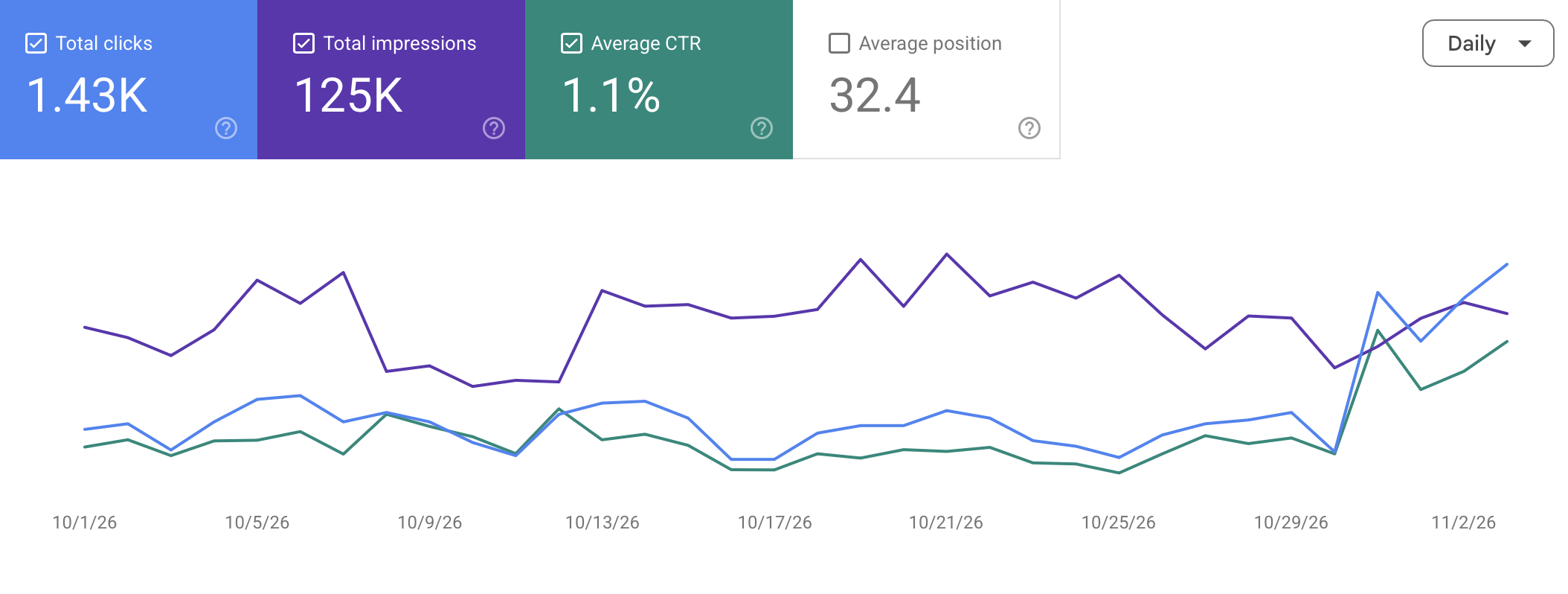
On one client's main service page, rewriting the title, H1 and opening paragraph, adding the sections the search intent needed and fixing internal links lifted clicks sharply within about two weeks of Google recrawling the page. The Search Console report is shown below. On-page SEO is included in all my SEO packages from ₹14,999 per month.
- Pages fixed in order of opportunity, starting with those Google already shows
- Changes made directly on WordPress, Shopify and custom sites
- Every result measured in Google Search Console
In Short
- Start with pages Google already shows but people don't click. They usually move fastest.
- Check the search intent before changing a word: the type of page that ranks decides what yours needs.
- The title tag, H1 and opening paragraph carry the most weight, because they tell Google and the reader what the page is about.
- The mistakes I find most often are two pages targeting one keyword, keyword stuffing, thin service pages and copy-paste location pages.
- Word-count targets, keyword density and the keywords meta tag make no difference, according to Google's own guidance.
What Is On-Page SEO, and How Is It Different From Technical and Off-Page SEO?
On-page SEO, also called on-site SEO or on-page optimisation, is everything you change on an individual page to make it the best answer to one search: what it says, how it is structured and how it links to the rest of your site. Technical SEO works on the whole site, and off-page SEO happens on other websites. The three do different jobs, and they come in a different order.
| On-page SEO | Technical SEO | Off-page SEO | |
|---|---|---|---|
| Works on | One page at a time | The whole site | Other websites |
| Examples | Title, meta description, H1, content, internal links, images, page-level schema | Crawling, indexing, site speed, canonical tags, sitemaps | Backlinks, brand mentions, reviews, directory listings |
| Who notices | Your visitors and Google | Mostly Google | Other sites' readers, and Google through them |
| When it comes first | Once Google can crawl and index the site | First, if pages aren't being crawled or indexed | After the pages are worth linking to |
The lines overlap at the edges. A canonical tag sits on a page but is a sitewide technical decision, and internal links are on-page work that also shapes how Google crawls the site. If your problem is sitewide, such as pages not appearing in Google at all, start with technical SEO. If your pages are indexed but not ranking or not getting clicked, the cause is usually on the page.
Why Do Well-Built Pages Still Fail to Rank?
Most pages I review don't fail because of design or speed. They fail because they don't make clear which search they answer, or they answer it less completely than the pages already ranking. These four mistakes come up on almost every site I audit.
Two Pages Targeting the Same Keyword
When two service pages, or a service page and a blog post, chase the same keyword, Google has to choose between them, and often neither ranks as well as one strong page would. This is called keyword cannibalisation. The fix is to decide which page owns the keyword, merge or refocus the other, and point internal links at the owner.
Titles and Content Stuffed With Keywords
Repeating the same keyword in the title, every heading and every paragraph still happens on many business sites. Google's spam policies call this keyword stuffing, and give blocks of text listing cities and areas only to rank as an example. Google's own title guidance tells site owners to avoid it. It also reads badly to the customer you want to convince.
Thin Service Pages
A service page with a heading, two generic paragraphs and a contact form gives Google little to compare against the pages already ranking. Customers want to know what is included, how it works, what the price depends on and why to choose you. When the page leaves those out, it loses to a page that answers them.
Copy-Paste Location Pages
Pages for Dwarka, Rohini and Noida with the same text and only the area name swapped fit what Google's spam policies describe as doorway pages: many pages aimed at different cities or regions that lead people to essentially the same thing. A location page earns its place only when it carries something specific to that area, which I cover on my local SEO page.
What Does My On-Page SEO Service Include?
Every page I work on gets the same eight checks, starting with the one that decides all the others: what the searcher actually wants.
Search Intent Check
Search intent is what the person wants from a search: to learn something (informational), compare options (commercial), act or buy (transactional), or reach a particular site (navigational). Before changing a word, I search the page's main keyword and look at what ranks. If Google shows service pages, a blog post won't rank for it, and the reverse is also true. The type of page the results share, and the questions they answer, decide what the page needs.
Title Tag and Meta Description
The title tag is the page title set in the code. Google uses it to build the clickable headline in search results, which it calls the title link, but it can also build that headline from the H1, other prominent text, anchor text and links pointing to the page. A title that is stuffed, outdated, repeated across many pages or doesn't match the page is the kind Google replaces. I write one distinct, descriptive title per page with the main keyword near the start. The meta description is the short summary under the title. Google builds that snippet mainly from the page content and uses the meta description when it describes the page more accurately, so I write it to match what the page really delivers.
H1 and Opening Paragraph
The H1 is the main heading a visitor sees first, and the opening paragraph is where they decide whether they are in the right place. In my experience the opening paragraph is the most important text on any page, because it defines what the page is about. I make the H1 say what the page offers and for whom, and rewrite the opening paragraph so it answers the search directly: what the service is, who it is for and what the reader gets. Google's title guidance also asks for one clearly main heading, so the H1 and the title tag should agree.
Filling the Content Gaps
I compare the page with what people searching for it need to know, and add what is missing. On many pages that means whole sections the topic requires but the page never covered, such as how the service works, what it depends on or the questions customers ask before they enquire. Adding what the reader needs is not the same as adding words. Google states that content length on its own doesn't matter for ranking.
Heading Structure
H2 and H3 headings split the page into sections a reader can scan, each answering one part of the topic. I write them so someone reading only the headings can tell whether the page answers their question.
Internal Links and Anchor Text
Internal links connect the page to related pages on your own site, and anchor text is the clickable text of a link. Google's SEO Starter Guide explains that good anchor text lets users and search engines understand what the linked page contains before they visit it. I link the page from related pages using descriptive anchors such as "dental implant cost" rather than "click here", and link out from it to the next page a reader would want.
Images and Alt Text
Alt text is a short description of an image that explains how it relates to the content. I add it wherever an image carries meaning, give files descriptive names and compress large images so the page loads quickly.
Page-Level Structured Data
Structured data, also called schema markup, labels what a page is, such as a service, a local business, a product or a breadcrumb trail, in a form search engines read directly. It must match what is visible on the page. On WordPress sites I usually set it through Rank Math. Product pages need their own set of fields, which I cover on my ecommerce SEO page.
What Happened When One Service Page Was Fixed?
Clicks rose sharply within about two weeks of Google recrawling the fixed page, after most of October had stayed flat. This is one client project, a custom WordPress website, where I fixed the main service page for its primary keyword.
What the report shows
Through most of October, clicks stayed flat while impressions moved up and down. Around 30 to 31 October, clicks and click-through rate jumped and kept climbing into November, while impressions rose only slightly. That pattern means the page moved up for searches it was already appearing in: people were now seeing it in positions they actually click.
What I changed
- Rewrote the title tag and meta description
- Fixed the H1 so it stated what the page offers
- Rewrote the opening paragraph to answer the search directly
- Added the sections the search intent needed and the page lacked
- Added internal links to and from relevant pages
- Requested indexing in Search Console's URL Inspection tool
Google states that requesting indexing doesn't guarantee the page will be indexed, and that it can take up to a week or two, so the timing differs from site to site. Every project starts from a different place and the approach changes with it, but these six changes are the ones I make on almost every site.
In What Order Do I Fix a Page?
I start with the pages that have the most to gain, then work through each one from search intent to internal links, and measure before moving on.
- Find the pages with the most to gain. In Search Console, these are pages with many impressions but few clicks, or pages ranking on page two. Google already considers them relevant, so they usually move fastest.
- Check the search intent. I compare each page with what currently ranks for its main keyword.
- Crawl and compare. A Screaming Frog crawl finds duplicate titles, missing H1s, thin pages and pages competing for the same keyword. Ahrefs shows the keywords each page ranks for and what competing pages cover.
- Fix the title, meta description, H1 and opening paragraph. These decide whether Google and the searcher understand the page.
- Add the missing content. I add the sections the search intent needs, in the order a reader would ask for them.
- Fix internal links. I link the page from related pages and give it clear routes onward.
- Request indexing and measure. I request indexing in Search Console, then track clicks, impressions and position over the following weeks to decide next month's priorities.
I make the changes directly on WordPress, Shopify and custom sites, or hand exact specifications to your developer where the site needs it. Whether you hire an on-page SEO company or an independent expert, ask to see the exact changes made to each page and the Search Console data before and after. With me, both are in every monthly report. The full month-by-month process is on the how I work page.
Why Fix On-Page SEO Before Building Links?
Because links help a page that already deserves to rank climb higher, but they don't turn a page that misses the search intent into the right answer. If a service page doesn't say clearly what it offers, or leaves out what customers need to know, backlinks pointing at it have far less to work with.
That is why on-page work is my main focus at the start of every project. Jumping straight to link building on a page that doesn't match its search is one of the most common ways I see SEO budgets wasted. Once the page is the right answer, links and mentions on other websites are what move it up in competitive searches.
What On-Page SEO Advice Doesn't Work?
Several things still sold as on-page SEO make no difference, according to Google's own SEO Starter Guide. These are the ones I tell clients not to pay for.
The Keywords Meta Tag
Google Search doesn't use the keywords meta tag. Filling it in does nothing for rankings.
Word-Count Targets
Google states that content length on its own doesn't matter for ranking. A page should be as long as the answer needs and no longer.
Keyword Density
Google publishes no target keyword density. Repeating a keyword to hit a percentage is the keyword stuffing its spam policies warn against.
Strict Heading Order Rules
Headings in a logical order help people using screen readers, so I keep them tidy. But Google says that from a Search point of view it doesn't matter if they are out of order.
Changing URLs to Add Keywords
Google says keywords in a domain or URL have almost no effect beyond appearing in breadcrumbs. Changing a working URL just to add a keyword means redirects and risk for very little gain.
Fear of a Duplicate Content Penalty
Google says content reachable at more than one URL is not something to worry about. The real problem is two different pages competing for one keyword, which is keyword cannibalisation, and that is fixed by deciding which page owns it.
Adding "E-E-A-T Signals" as a Checklist
Google states that E-E-A-T (experience, expertise, authoritativeness and trust) is not itself a ranking factor. What helps is a page that genuinely shows who is behind it and why they can be trusted, not badges added for a score.
Is On-Page SEO Right for Your Website?
It is the right place to start if your pages already appear in Google but get few clicks, rank on page two, or bring in the wrong enquiries. Those are signs Google sees the page as relevant but not the best answer, which is exactly what on-page work fixes.
It isn't the first fix if Google isn't indexing your pages at all. That is a technical problem and needs fixing first. And if you don't yet have a page for a service you sell, the job is writing that page, not optimising one. The free SEO audit shows which of these applies to your site.
Before starting, most business owners ask the same few questions about cost, timing and why Google changes their page titles. Here are direct answers.
What Questions Do Delhi Businesses Ask About On-Page SEO?
How much do on-page SEO services cost in Delhi?
On-page SEO is included in all my SEO packages from ₹14,999 per month. I don't sell it as a one-off checklist, because the pages that need work change as rankings and competitors move.
How long does on-page SEO take to show results?
It depends on how quickly Google recrawls the page and how far the page has to move. On one project, clicks rose within about two weeks of the recrawl. Pages in more competitive searches usually take longer, and some changes take a few months to show their full effect.
Why did Google change my page title in search results?
Google builds the title shown in search results from several sources, including your title tag, H1, other prominent text and links pointing to the page. It tends to replace a title tag that is missing, stuffed with keywords, outdated, repeated across many pages or doesn't match the page. A clear, distinct title that agrees with the H1 is more likely to be used.
Does Google use my meta description?
Sometimes. Google builds the snippet mainly from the page content that best matches each search, and uses the meta description when it describes the page more accurately. It is still worth writing a distinct one for every important page.
How many keywords should one page target?
One main search need, plus the close variations of it. A page for "dental clinic in Janakpuri" can also rank for "dentist Janakpuri", because both are the same need. A clearly different need, such as treatment cost, may deserve its own page if people search for it separately.
Can on-page SEO alone get a page ranking?
For lower-competition searches, often yes. In competitive searches, on-page work makes the page the right answer, and links and reputation decide how high it climbs.
Is on-page SEO a one-time job?
No. Search results change, competitors update their pages and your services change, so I review the main pages every month against Search Console data.
Find Out What Is Holding Your Pages Back
Start with a free SEO audit. I will review the titles, headings, content and internal links on your main pages against what ranks for your keywords, and show you which pages to fix first.
Get Your Free SEO Audit →Or call directly: +91 9971255043 · connect@sandeepmehta.co.in